

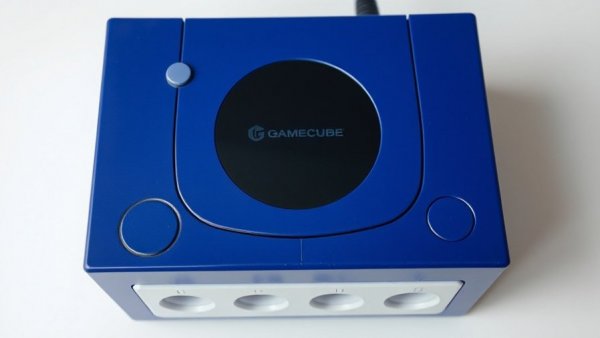
Rediscovering the Joy of GameCube
As the 25th anniversary of Nintendo's GameCube approaches, many fans are eager to relive the magic of this beloved sixth-generation console. Though overshadowed by competitors like the PlayStation 2, the GameCube boasts timeless classics, including The Legend of Zelda: The Wind Waker and Metroid Prime. It's the perfect time to dust off that old console, but if you're worried about the compatibility with your modern TV, worry not! Let’s explore how to bridge the gap between vintage gaming and contemporary technology.
Knowing Your GameCube Model
Before you dive into the world of connectors and cables, it's essential to identify your GameCube model. The DOL-001 version is your golden ticket— equipped with the coveted Digital AV Out connection, allowing for an HDMI output. On the other hand, the DOL-101 lacks this vital port, making things a little trickier. Just flip your console and check the label; if it says DOL-001, you're good to go! This simple identification step is crucial for connecting successfully.
Connecting Your GameCube to Modern TVs
Once you have the right model, connecting it to your modern LCD or OLED TV can be a breeze. Purchase an HDMI adapter— a solid choice is the Retro-Bit Prism HD Adapter, praised for its quality and ease of use. Not only does it connect smoothly to your GameCube’s Digital AV Out, but it also features a USB-C port for easy software updates. Don’t skimp on the adapter, as quality can significantly affect your gaming experience. If you prefer budget-friendly options, brands like Bitfunx are reputable as well. Remember, depending on your choice, you may need an additional HDMI cable. Once set up, you’ll be enjoying those nostalgic games in style!
Achieving Optimal Visuals
To take your visuals to the next level, explore if any of your GameCube games support 480p output. This can sometimes be found in the game settings, and it enhances the image quality significantly. After putting in a compatible game, hold down the B button during startup to enable progressive scan—a true game-changer for nostalgia fans! You might uncover options for native widescreen output as well, unlocking your classic games’ full potential on modern screens.
Final Touch: GameTime
With everything set up, get comfortable, grab your controller, and dive into the classic titles that defined a generation. Whether you’re revisiting old friends or discovering gems for the first time, the GameCube can still deliver joy in a modern format. So what are you waiting for? It's time to resurrect those epic gaming sessions!

Write A Comment