
cropper
Daily Device Finds
  • Home
  • Categories
    • Industry News & Trends
    • Product Recommendations & Best-Of Lists
    • Marketing Tools Reviews
    • Expert Tips on Choosing Products
June 23.2026
2 Minutes Read

HDMI 2.0 vs. 2.1: Essential Guide for Streaming Enthusiasts

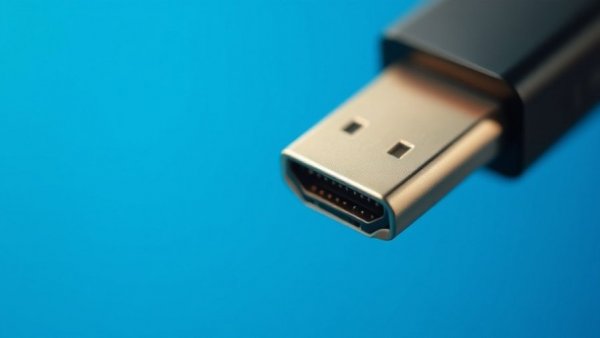
Close-up view of HDMI connector highlighting metallic details.

Understanding HDMI: What’s the Difference?

Most home entertainment setups use HDMI to transmit audio and video signals, and whether you're streaming movies, gaming, or working from home, it's essential to know which type of HDMI cable you need. Currently, HDMI 2.0 (introduced in 2013) and HDMI 2.1 (announced in 2017) are the two most commonly used versions. The primary difference between them lies in bandwidth: HDMI 2.0 supports up to 18 Gbps, while HDMI 2.1 can handle an impressive 48 Gbps.

Do You Really Need HDMI 2.1?

While HDMI 2.1 allows for stunning features like 4K resolution at a smoother refresh rate of 120Hz, most streaming services still cap their quality at 4K and 60Hz. Essentially, if you're primarily using your HDMI for streaming platforms to watch movies or series, HDMI 2.0 can handle everything you throw at it without a hitch. Your streaming experience won't suffer with 2.0 cables.

When Should You Upgrade?

Upgrading to HDMI 2.1 might be beneficial if you’re a hardcore gamer seeking smoother gameplay or if you plan to invest in future technology that utilizes 8K resolutions. For instance, consoles like the PlayStation 5 and Xbox Series X benefit from HDMI 2.1 due to their support for higher refresh rates and variable refresh rates, a game-changer for avid gamers.

Practical Tips for Your Setup

For most users, understanding your current needs is crucial. If you primarily watch streaming services in 4K and enjoy casual gaming, stick with HDMI 2.0. If you’re looking to future-proof your gaming or investing in high-end 4K displays, consider upgrading to HDMI 2.1. Remember, using the right cable can optimize your setup without breaking the bank.

Conclusion: Choose What’s Right for You

In the end, while HDMI 2.1 boasts impressive specifications, HDMI 2.0 remains a robust choice for everyday users. Assess your priorities; if you're not pushing for features like high frame-rate gaming or 8K streaming today, the older HDMI standard will serve you just fine.
Industry News & Trends

7 Views

0 Comments

Write A Comment

*
*
Please complete the captcha to submit your comment.
Related Posts All Posts
09.22.2026

How Unplugging Your PC During Power Outages Can Save It

Update Protecting Your PC: A Simple Power Outage Precaution When the lights go out, it’s easy to focus on finding a flashlight instead of considering the state of your electronics. But for those students and remote workers relying heavily on their PCs, unplugging your computer during a power outage can be a game changer. After all, a dark computer might not seem vulnerable, but even turned off, it’s still connected to your home’s wiring—a risky position when power returns. Understanding the Risks of Power Surges A power outage doesn’t just mean a black screen; it can trigger voltage fluctuations. Let’s face it: when power is restored, those sudden spikes can be more damaging than the outage itself, especially since most household circuits operate at 120 volts. In moments before and after an outage, these fluctuations can wreak havoc on delicate components like motherboards and SSDs. How to Best Prepare for Outages To protect your tech, it’s imperative to unplug your PC as soon as you know a storm is brewing—don’t just turn it off! You might also consider unplugging other vulnerable gadgets like your router, which are often fried during electrical storms. And remember to invest in a quality surge protector, which can absorb those nasty voltage spikes. The Value of an Uninterruptible Power Supply (UPS) If you want even better security, an uninterruptible power supply (UPS) is your best friend against short outages. It won’t keep you powered for hours, but it can prevent data loss during those unexpected blackouts and let you save your work without the panic. Staying Safe During Power Returns Finally, when the power does come back, don’t rush to plug everything back in. Give it a few minutes to stabilize before reconnecting your devices. Think of it as giving your electronics a well-deserved break, keeping them safe from surges until the power grid settles down. So next time a storm hits, remember that a simple unplug could save you from countless headaches in repairs and data loss. Your technology will thank you!

09.22.2026

How Using Velcro Can Extend Your HDD's Lifespan and Silence Noise

Update Why HDDs Are Still Essential for Your Tech SetupHard disk drives (HDDs) might seem outdated with the rise of SSDs, but they still play a crucial role for many users, especially students and remote workers. They are economical, offering ample storage for backups and file archiving. Understanding how to maintain and protect these drives can extend their lifespan, ensuring that your device remains efficient and functional.Prolonging Life with a Simple FixUsing a $2 strip of Velcro, or any suitable hook-and-loop fastener, is a crafty and effective solution to take care of your vulnerable HDDs. How does it work? By securing drives effectively, it helps minimize vibrations and rattling, common culprits behind premature drive failure. Instead of being mounted directly onto metal, the Velcro helps insulate the drive against movement, letting it do its job quietly and efficiently.Importance of Secure MountingWhen it comes to installation, ensuring that your HDD is tightly secured is paramount. For desktop setups and NAS systems, using screws or clips correctly will dampen vibrations and prevent damage. If your drive can’t stay still, it can suffer data loss or even mechanical failure over time. Remember, keeping things snug—but not overly tight—is the key to longevity.The Perks of DIY Tech SolutionsImplementing easy, low-cost fixes like this Velcro hack not only saves you money but also satisfies your inner DIY enthusiast. It’s practical, effective, and it gives your tech setup a touch of personal flair. Plus, it encourages a sense of creativity in maintaining and optimizing your devices, making technology feel more approachable.Key Benefits of Using Velcro for HDDs - Silent operation: Reduce noise levels in your workspace, making it more conducive for studying or working. - Increased lifespan: Proper mounting techniques result in fewer physical shocks, which can help avoid data loss. - Cost-effective: A minimal investment for maximal results, proving that tech care doesn’t have to break the bank.Get Tech-Savvy with More Tips!Taking care of your devices can seem daunting, but every little action helps. Understanding simple upgrades or adjustments—like using the best desk charging stations or surge protectors—makes all the difference in your tech experience. Discover more ways to enhance your setup!

09.21.2026

Discover the Power of SpaceXAI’s Grok Bot for Effortless Task Management

Update SpaceXAI's Grok Bot: Your New Personal Digital AssistantIf you're juggling multiple tasks as a student or remote worker, let me introduce you to Grok Bot, an exciting new digital work assistant from SpaceXAI. Currently in early beta, this clever tool is designed to take some of the load off your shoulders, acting like a virtual teammate that can manage tasks across your favorite apps, including Gmail, LinkedIn, and Salesforce.What Exactly is Grok Bot?Think of Grok Bot as your own digital helper. It can fill out forms, respond on social media, send emails, and do much more—all while you focus on other important tasks. But there's a bit of a mix-up as some people confuse Grok Bot with other Grok versions, like the chatbot or coding agent, Grok Build. The beauty of Grok Bot lies in its ability to perform simple tasks without needing constant supervision, which is perfect for students or busy office workers.How to Get Started with Grok BotGetting your hands on the Grok Bot is pretty straightforward! If you’re a subscriber of certain SpaceXAI or Cursor plans, you can head to the official Grok Bot page, select your download option, and start exploring. First, set up a bot and assign it some easy tasks—perhaps sorting out research notes or summarizing documents. Just remember, since Grok Bot is still in beta, it's wise to start with lower-risk assignments while you find your feet.A Word of CautionWith great power comes great responsibility. Before you hand over the reins, ensure that your Grok Bot isn’t performing sensitive tasks without your oversight. Making those first few commands simple and harmless can give you confidence as you learn what this nifty assistant can do.The Value of AutomationThe real draw of Grok Bot is its ability to save time—an essential commodity for anyone balancing multiple responsibilities, especially students and remote workers. By delegating tasks, you can free up hours each week, leaving room for creativity, learning, or simply enjoying some well-deserved downtime.Ready to Try Grok Bot?With its potential to transform how you work and study, why not give Grok Bot a shot? Visit the official Grok Bot page today to learn more and start your journey toward a more efficient digital workspace. Say goodbye to monotonous tasks and hello to your new working partner!

Daily Device Finds

Our site is here to make shopping easier with honest recommendations, useful comparisons, and practical guides you can trust.

Affiliate Disclosure:

Some of the links on this page may be affiliate links, which means I may earn a commission if you make a purchase through them, at no additional cost to you.

© 2026 CompanyName All Rights Reserved. Address . Contact Us . Terms of Service . Privacy Policy

Terms of Service

Privacy Policy

Core Modal Title

Sorry, no results found

You Might Find These Articles Interesting

T
Please Check Your Email
We Will Be Following Up Shortly
*
*
*